
As Magic Poser evolves over the years, we have improved the posing mechanisms of our characters over time. That also means that we have three versions of character skeletons and posing mechanisms in our app. But don't worry, they only differ in small details and once you understand the other parts of this posing tutorial, which are based on the v3 (newest) characters, it should be super easy to understand how to pose the other versions!
View generation info of characters
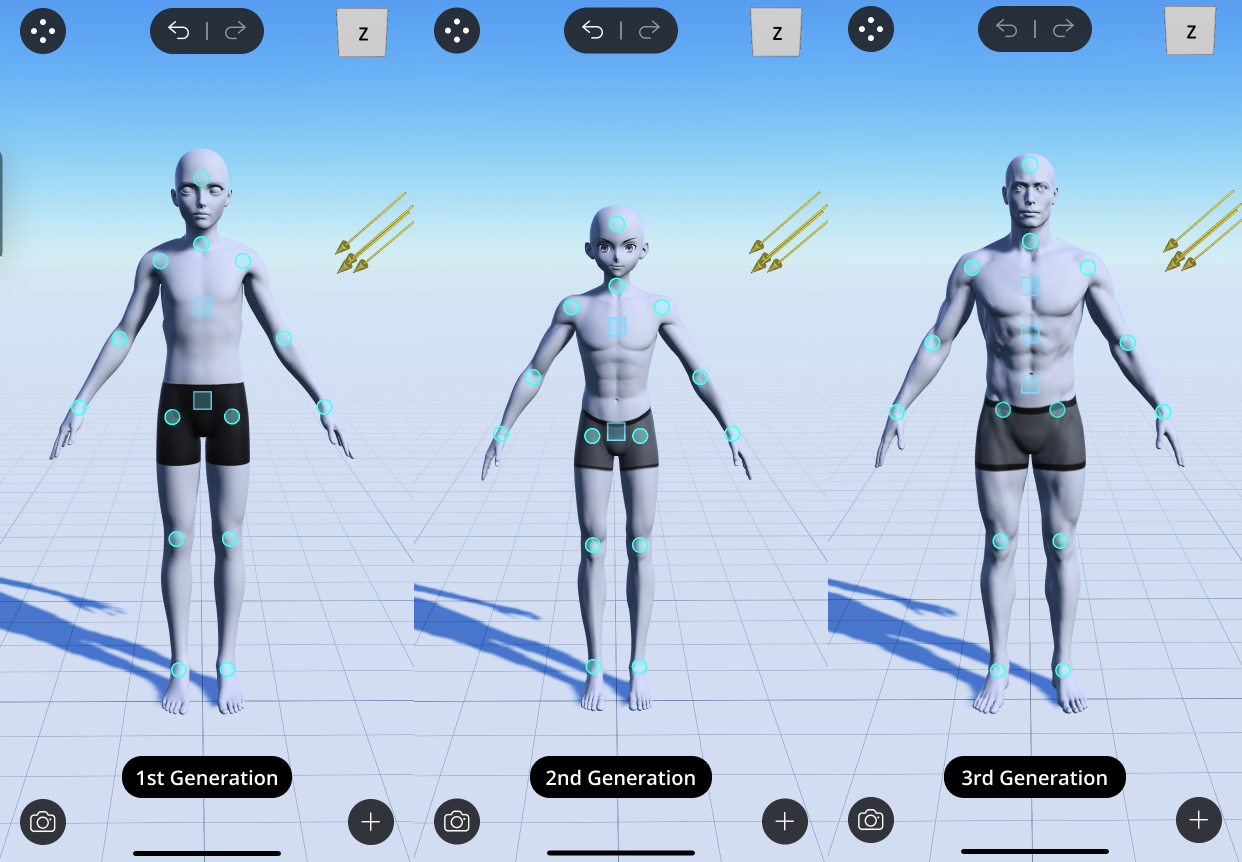
Our characters are split into 3 generations:
- 1st generation: Released in 2016.
- 2nd generation: Released in 2019.
- 3rd generation: Released in 2022.
You can check the generation info of our characters in the details page of the Asset Library. To learn more about how to use our Asset Library, please refer to the Asset Library guide.
General differences
With every generation of models, we are always improving them to look as close to real humans as possible. This means that overall:
- Models of newer generations behave more naturally when you pose them.
- Models of newer generations have much better muscle deformations.
- Models of newer generations have more range of motions. Especially with our newest generation, the 3rd generation, we designed them to have all possible range of motions that a real human would have. Certain poses that are not achievable with older generations of models will be achievable with the 3rd generation.
Therefore, we strongly advise you to first try our 3rd generation models for your art piece. If you cannot find a model that you like within the 3rd generation, our 2nd and 1st generations offer very nice alternatives as well!
We are also constantly updating our older generation models to have the same mechanism of the newest generation. Please check the Asset Library in the app and our official social media accounts for any major updates!
Difference in posing the spine
One of the biggest improvements we made with the 3rd generation characters is the posing of the spine. There are three square control points  on the spine on our 3rd generation characters instead of two control points as on 1st or 2nd generation characters. Here is a summary of the main differences:
- The middle control points allows much smoother curvature of the spine when you bend it.
- Rotating the top control point allows you to bend the thoracic spine on 3rd generation characters, allowing you to achieve poses such as pushing out your chest or sitting crouched down.
Difference in posing the toes
Please note that the first generation does not support posing the toes. Both 2nd and 3rd generation support posing every single joint of the toes!
Preset poses for different generations
The older generations do not have all of the preset poses that are available for the 3rd generation. This is because:
- Certain preset poses do not look as good on the older generations as on the 3rd generation, due to the limitations of the posing mechanisms of the older generations.
- We prefer first updating our older characters to the newer posing mechanisms and then making preset poses for them, instead of making preset poses with their existing posing mechanisms.
Swap characters between generations
There's a workaround for using the more advanced posing mechanism/preset poses of the newer generation and applying that to an older generation model that you like!
- Make the desired pose or pick the desired preset pose on the newer generation character.
- Refer to the Swap Character guide to learn how to swap to a different character. The swap mostly works very well, except for some very extreme poses.
Comments
0 comments
Please sign in to leave a comment.